Tabs and bookmarks,sorted by your own AI.
Browser Organizer groups your open tabs by topic, closes the ones you forgot, and clears out dead or duplicate bookmarks. It runs on a local AI CLI or your own OpenAI-compatible key, so your tabs only ever reach the provider you already pay for. Review every change, or let it run on a schedule with one-click undo.
What it does
Four kinds of cleanup, one button. Everything is a suggestion you approve before it happens.
Turn a 200-tab window into named groups.
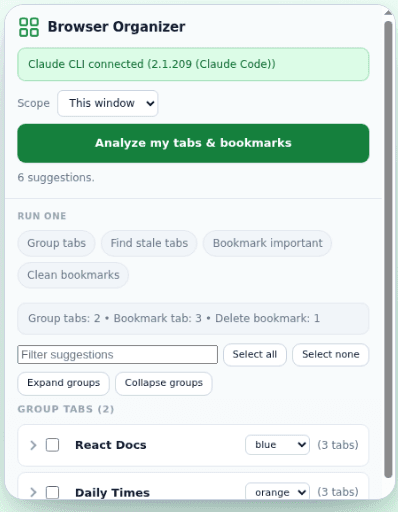
Click Analyze and Browser Organizer reads your open tabs, clusters them by topic, and proposes tidy tab groups. Forgotten tabs get flagged to close or suspend, and anything worth keeping is bookmarked first.
Tidy bookmarks
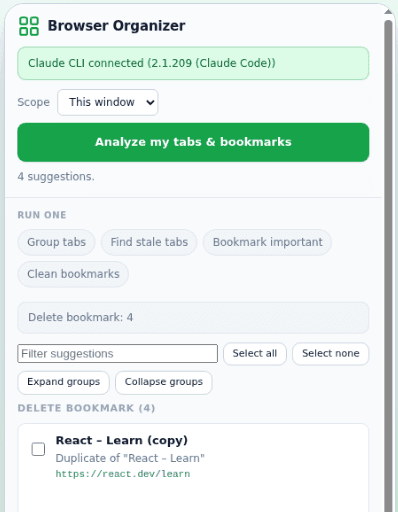
Finds duplicate, stale, and dead bookmarks, with an optional link check, and files the useful ones into clean folders.
Plain-language commands
Type org close everything about travel in the address bar and it builds an actionable plan.
Set it and forget it
Scheduled auto-mode runs quietly in the background. Every action is logged so a single click undoes it.
A look inside the panel
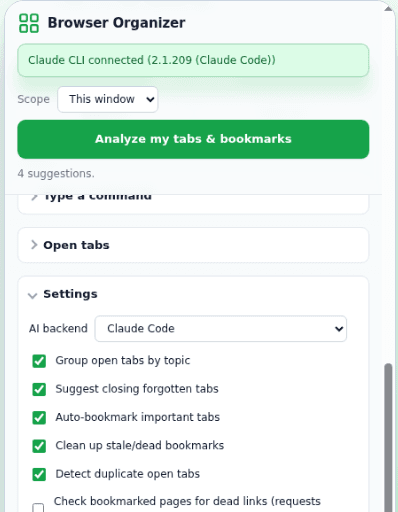
Everything runs from one side panel. Here it is grouping tabs, cleaning up bookmarks, and letting you choose the AI that does the work.
Bring your own AI
No accounts with us, no servers we run. Point it at a local AI CLI or any OpenAI-compatible endpoint. Your tab titles and URLs go only to the provider you choose; bookmarks and history never leave your machine.
Up and running in minutes
Two parts: the extension, and a small local helper that runs your AI backend.
Load the extension
Add Browser Organizer to Chrome or Edge (unpacked today, one-click from the stores soon).
Install the helper
With Node 20+ installed, run this from any terminal:
npx @lusktech/browser-organizer-hostNo terminal? Grab the per-OS installer from the releases page.
Pick a backend
Open the side panel, choose your AI in Settings, and click Analyze. See the full install guide for details.
Get your tabs under control.
Free, open source, and yours to run however you like.